This is Part 2 of a 5-part series on building efficient systems with TypeORM.
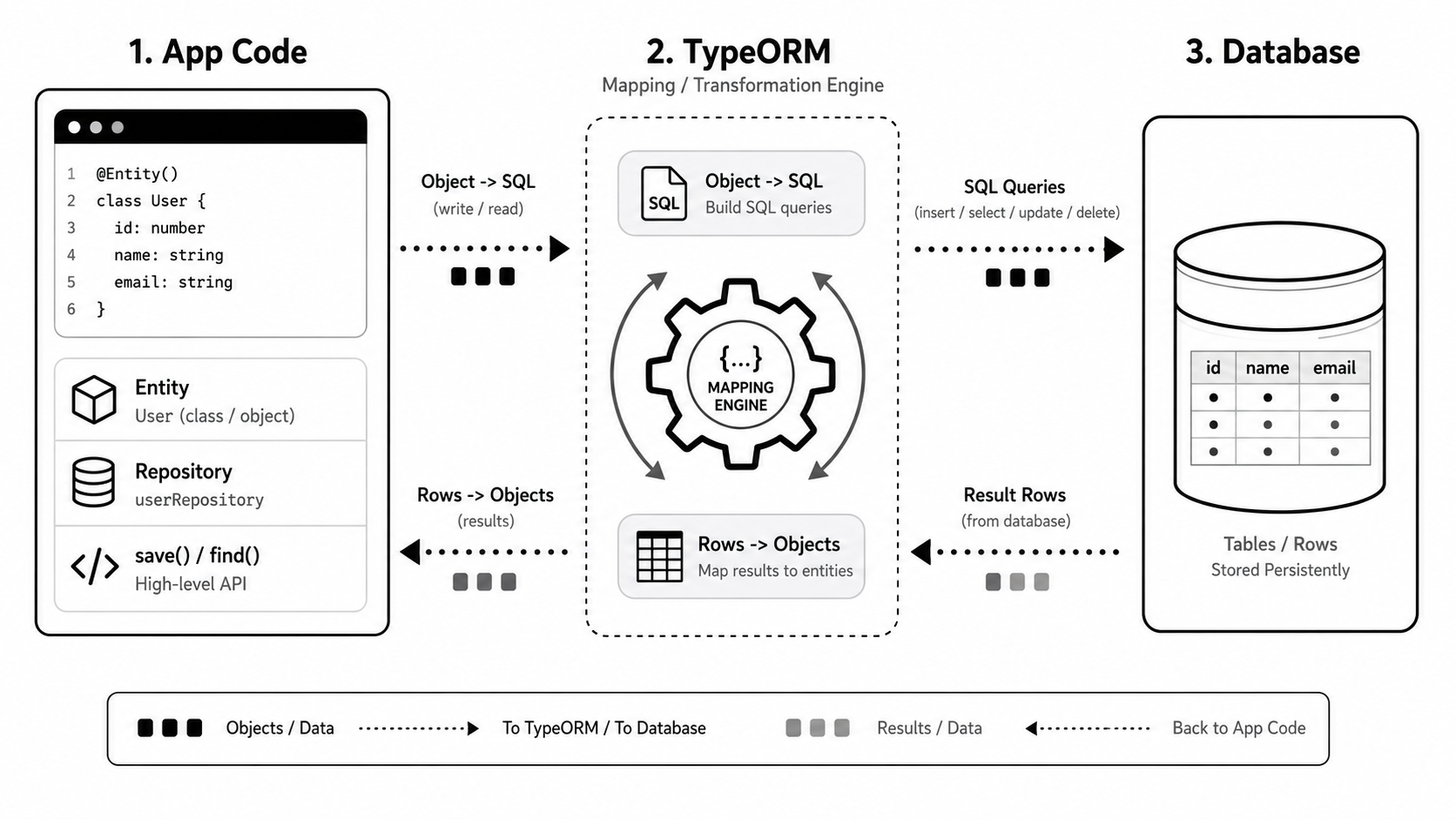
Avoid N+1 Queries by Designing the Load Shape
TypeORM does not fetch relations by default unless you ask for them with relations, define them as eager: true, or join them yourself.
That is good. It means you control the query shape.
The common mistake is fetching a list, then querying related data inside a loop:
const businesses = await this.businessesRepo.find({ take: 100 });

for (const business of businesses) {
  const owner = await this.usersRepo.findOneByOrFail({
    id: business.ownerUserId,
  });

  console.log(owner.email);
}
That pattern runs one query for the list, then one extra query per row. With 100 businesses, you now have 101 queries.
If the endpoint needs the relation, load it directly:
const businesses = await this.businessesRepo.find({
  relations: {
    owner: true,
  },
  order: { createdAt: 'DESC' },
  take: 100,
});
The rule is simple:
Load exactly what the endpoint needs, in the shape the endpoint needs it.
Use View Entities for Stable Read Models
Some screens are naturally read models. They combine tables, expose aggregates, or apply the same filters every time.
Instead of scattering that SQL across services, you can put the projection behind a TypeORM @ViewEntity.
@ViewEntity({
  name: 'business_directory_view',
  expression: `
    SELECT
      business.id,
      business.name,
      business.slug,
      business."isVerified",
      owner.id AS "ownerUserId",
      profile."displayName" AS "ownerDisplayName"
    FROM businesses business
    INNER JOIN users owner ON owner.id = business."ownerUserId"
    LEFT JOIN profiles profile ON profile."userId" = owner.id
    WHERE business."deletedAt" IS NULL
  `,
})
export class BusinessDirectoryView {
  @ViewColumn()
  id!: string;

  @ViewColumn()
  name!: string;

  @ViewColumn()
  slug!: string;

  @ViewColumn()
  isVerified!: boolean;

  @ViewColumn()
  ownerUserId!: string;

  @ViewColumn()
  ownerDisplayName!: string | null;
}
Then query it like a read-only repository:
const rows = await this.directoryRepo.find({
  where: { isVerified: true },
  order: { name: 'ASC' },
  take: 50,
});
Use view entities for stable, read-heavy projections. Do not use them to hide business rules that belong in services.
Pagination and Limits Should Be Enforced
Pagination is not only about moving through pages of data. It is also one of the easiest ways to prevent expensive reads.
Never trust the client to decide how much data your API should return. A request like ?limit=100000 can turn a simple endpoint into a database and memory problem.
Start with a default limit, enforce a maximum limit, and keep the ordering stable:
const DEFAULT_LIMIT = 25;
const MAX_LIMIT = 100;

const limit = clamp(query.limit ?? DEFAULT_LIMIT, 1, MAX_LIMIT);
const offset = Math.max(query.offset ?? 0, 0);

return this.businessesRepo.find({
  where,
  order: {
    createdAt: 'DESC',
    id: 'DESC',
  },
  take: limit,
  skip: offset,
});
That small guardrail protects you from accidental full-table reads and keeps the endpoint predictable.
For large or frequently changing tables, cursor pagination is usually safer than offset pagination. It avoids unstable pages when new rows are inserted and works better with indexes.
const limit = clamp(query.limit ?? 25, 1, 100);

const qb = this.businessesRepo
  .createQueryBuilder('business')
  .orderBy('business.createdAt', 'DESC')
  .addOrderBy('business.id', 'DESC')
  .take(limit + 1);

if (query.cursor) {
  const cursor = decodeCursor(query.cursor);

  qb.where('(business.createdAt, business.id) < (:createdAt, :id)', {
    createdAt: cursor.createdAt,
    id: cursor.id,
  });
}

const rows = await qb.getMany();
const page = rows.slice(0, limit);

return {
  data: page,
  hasNextPage: rows.length > limit,
  nextCursor: page.length
    ? encodeCursor(page[page.length - 1].createdAt, page[page.length - 1].id)
    : null,
};
The production rule is:
- a default limit
- a maximum limit
- stable ordering
- a deterministic tie-breaker, usually
id - predictable metadata such as
hasNextPageortotal
Do this even for internal APIs. Internal endpoints have a funny way of becoming important later.
Keep Transactions Small and Honest
A transaction says: these operations must succeed or fail together.
Good transaction boundaries:
- create a user and profile together
- create a business and membership together
- update an idempotency key and the result it protects
- move a record through a state transition and write the audit log
Bad transaction boundaries:
- database writes plus an external HTTP call
- database writes plus a side event, background task or any async work
- thousands of rows processed without batching
- unrelated updates grouped because it felt convenient
The best transactions are short, explicit, and easy to explain.
To reliably coordinate database writes with asynchronous side effects, use the transactional outbox pattern. This ensures your external tasks—like sending an email or publishing a message—only trigger if the transaction commits successfully.
Design Indexes Around Real Queries and Use Cases
An index helps the database find rows quickly.
Without a useful index, the database may need to scan a large part of a table to find matching rows. With the right index, the database has a prepared access path based on the columns, expressions, or data structures you indexed.
For example, this endpoint always filters active businesses by owner and sorts the newest records first:
const businesses = await this.businessesRepo.find({
  where: {
    ownerUserId,
    deletedAt: IsNull(),
  },
  order: {
    createdAt: 'DESC',
    id: 'DESC',
  },
  take: 25,
});
Instead of randomly indexing every column, create an index that matches that query:
import { MigrationInterface, QueryRunner } from 'typeorm';

export class AddBusinessOwnerActiveIndex1710000000000
  implements MigrationInterface
{
  name = 'AddBusinessOwnerActiveIndex1710000000000';

  public async up(queryRunner: QueryRunner): Promise<void> {
    await queryRunner.query(`
      CREATE INDEX CONCURRENTLY IF NOT EXISTS idx_businesses_owner_active_created_id
      ON businesses ("ownerUserId", "createdAt" DESC, id DESC)
      WHERE "deletedAt" IS NULL
    `);
  }

  public async down(queryRunner: QueryRunner): Promise<void> {
    await queryRunner.query(`
      DROP INDEX CONCURRENTLY IF EXISTS idx_businesses_owner_active_created_id
    `);
  }
}
This works because the database can use the index to quickly narrow down rows by ownerUserId, ignore soft-deleted records, and return results in the same order the endpoint needs.
B-tree indexes are the most common index type. They are great for equality checks, sorting, and range queries, which makes them a solid default for many application tables.
But B-tree should not be your only mental model. Your query and use case should drive the index choice.
Common PostgreSQL index types:
- B-tree: the default choice for equality, sorting, ranges, unique constraints, and most foreign-key lookup patterns.
- Hash: equality-only lookups. Use rarely, because B-tree usually handles equality well and is more flexible.
- GIN: arrays, JSONB containment, full-text search, and trigram search through extensions such as
pg_trgm. - GiST: ranges, geospatial data, nearest-neighbor style searches, and exclusion constraints.
- SP-GiST: specialized partitioned search spaces, some geometric data, prefix-like lookups, and specific operator classes.
- BRIN: huge append-only tables where values naturally follow physical order, such as audit logs, metrics, and event histories.
Also remember the write cost. Every index must be maintained on insert, update, and delete. A table with too many indexes can make reads feel fast while quietly slowing writes.
A healthy index review asks:
- Which endpoint or constraint uses this index?
- Does it match the filter and sort order?
- Does the query planner actually choose it?
- Is it duplicated by another index?
- What is the write and storage cost?
Indexing becomes useful when it follows real access patterns, not when it follows a checklist.
Use Database Extensions Intentionally
PostgreSQL has a lot of well-vetted extensions that can make a database more efficient, reliable, and pleasant to work with.
The mistake is thinking that using TypeORM means ignoring those features.
Use TypeORM for entities, repositories, and normal application queries. Use migrations to enable extensions and database capabilities that support your real product needs.
Common PostgreSQL extensions worth knowing:
citext: case-insensitive text. Useful for emails, usernames, and slugs whereToyeeb@example.comandtoyeeb@example.comshould be treated as the same value.pg_trgm: trigram search. Useful for practical fuzzy search, autocomplete, typo-tolerant matching, andILIKEperformance.uuid-ossp: UUID generation helpers. Useful when the database needs to generate UUID values.pgcrypto: cryptographic helpers, includinggen_random_uuid(). Useful for database-generated UUIDs and some hashing/encryption workflows.btree_gist: lets GiST constraints work with normal scalar values. Useful for exclusion constraints, such as preventing overlapping bookings for the same room.postgis: geospatial types, indexes, and functions. Useful for maps, nearby search, delivery zones, and location-based products.unaccent: removes accents from text. Useful for search experiences where users may type names without accents.pg_stat_statements: tracks query execution statistics. Useful for finding slow or frequently executed queries in production.
Manage extensions in migrations so every environment is consistent:
import { MigrationInterface, QueryRunner } from 'typeorm';

export class EnablePostgresExtensions1710000000001
  implements MigrationInterface
{
  name = 'EnablePostgresExtensions1710000000001';

  public async up(queryRunner: QueryRunner): Promise<void> {
    await queryRunner.query(`CREATE EXTENSION IF NOT EXISTS citext`);
    await queryRunner.query(`CREATE EXTENSION IF NOT EXISTS pg_trgm`);
    await queryRunner.query(`CREATE EXTENSION IF NOT EXISTS pgcrypto`);
    await queryRunner.query(`CREATE EXTENSION IF NOT EXISTS btree_gist`);
  }
}
Keep extension usage visible:
- create extensions in named migrations
- name indexes and constraints clearly
- add short comments when raw SQL is not obvious
- test important database errors, especially uniqueness and constraint violations
- document non-obvious database dependencies
Extensions are not shortcuts around good design. They are proven tools that help the database enforce rules, search better, and serve data more efficiently.
Closing Thoughts
The theme of this chapter is intentionality.
Do not let TypeORM accidentally decide your load shape, pagination behavior, transaction boundary, or index strategy. Use the ORM where it makes the everyday path clear, then step into QueryBuilder, migrations, constraints, and PostgreSQL features when the production contract needs more precision.
In this chapter, we covered:
- Avoiding N+1 queries by designing the load shape.
- Using View Entities for stable read models.
- Enforcing pagination limits to prevent expensive reads.
- Keeping transactions small and honest.
- Choosing indexes based on query patterns and use cases.
- Using PostgreSQL extensions to improve efficiency and reliability.
In the next chapter: We'll explore concurrency control with locks, using upserts effectively, handling sensitive data, and applying TypeORM caching without turning it into a mystery box.